<Folder>
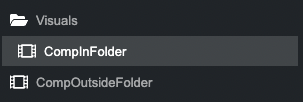
By wrapping a <Composition /> inside a <Folder />, you can visually categorize it in your sidebar, should you have many compositions.
Example
import {Composition , Folder } from 'remotion';
export const Video = () => {
return (
<>
<Folder name ="Visuals">
<Composition id ="CompInFolder" durationInFrames ={100} fps ={30} width ={1080} height ={1080} component ={Component } />
</Folder >
<Composition id ="CompOutsideFolder" durationInFrames ={100} fps ={30} width ={1080} height ={1080} component ={Component } />
</>
);
};will create a tree structure in the sidebar that looks like this:
Folder behavior
- They only visually change the sidebar in the Remotion Studio and have no further behavior.
- Folder names can only contain
a-z,A-Z,0-9and-. - Folders can be nested.
Compatibility
| Browsers | Environments | |||||
|---|---|---|---|---|---|---|
Chrome | Firefox | Safari | ||||